http://www.cookcomputing.com/blog/archives/000578.html
Monday, 9 October 2017

Thursday, 14 September 2017
Wednesday, 6 September 2017
securing web apps
https://www.codeproject.com/Articles/1116318/Points-to-Secure-Your-ASP-NET-MVC-Applications
Monday, 4 September 2017
cheat sheets
https://weblogs.asp.net/bradvincent/linq-cheat-sheet
https://download.damieng.com/dotnet/LINQToSQLCheatSheet.pdf
http://nickberardi.com/content/images/2008/02/linq-standard-query-operators.pdf
https://oscarotero.com/jquery/
https://makeawebsitehub.com/jquery-mega-cheat-sheet/
http://www.tutorialsteacher.com/linq/linq-element-operator-first-firstordefault
https://download.damieng.com/dotnet/LINQToSQLCheatSheet.pdf
http://nickberardi.com/content/images/2008/02/linq-standard-query-operators.pdf
https://oscarotero.com/jquery/
https://makeawebsitehub.com/jquery-mega-cheat-sheet/
http://www.tutorialsteacher.com/linq/linq-element-operator-first-firstordefault
Tuesday, 29 August 2017
calling service $resource from controller
var axiommodule = angular.module("appaxiom", ['ngResource']);
axiommodule.controller("appcontroller", function (axiomservice) {
var vm = this;
vm.hello = "hellow angular";
vm.name = axiomservice.GetStudent();
var student = { Name: 'new', Age: '34', Semester: '4th' };
axiomservice.StudentResource().get({ teacherid: 1 },
function (response)
{
alert(response.Name);
});
//axiomservice.StudentResource.update({id:1},function (response) {
// alert('deleted');
//});
// alert(vm.student);
//.
// then(function (response) {
// alert('');
// });
});
axiommodule.service("axiomservice", function ($http,$resource) {
this.GetStudent = function () {
return "hello ! world angular you are very cruel";
};
this.StudentResource = function () {
return $resource('api/Student', {id:'@id',teacherid:'@teacherid'});
};
});
=========================factory way of calling resource===================
var mod = angular.module('appmodf', ['ngResource']);
mod.controller('gridController', function (gridFactory) {
var vm = this;
gridFactory.studentrepo.query(successCallBack,errorCallBack);
function successCallBack(data)
{
vm.students=data;
}
function errorCallBack(error)
{
vm.error=error;
}
});
mod.factory('gridFactory', function ($resource) {
var service = { studentrepo: $resource(' http://localhost:6074/api/Student/:id/:teacherid', { id: '@id', teacherid: '@teacherid' }) };
return service;
});
axiommodule.controller("appcontroller", function (axiomservice) {
var vm = this;
vm.hello = "hellow angular";
vm.name = axiomservice.GetStudent();
var student = { Name: 'new', Age: '34', Semester: '4th' };
axiomservice.StudentResource().get({ teacherid: 1 },
function (response)
{
alert(response.Name);
});
//axiomservice.StudentResource.update({id:1},function (response) {
// alert('deleted');
//});
// alert(vm.student);
//.
// then(function (response) {
// alert('');
// });
});
axiommodule.service("axiomservice", function ($http,$resource) {
this.GetStudent = function () {
return "hello ! world angular you are very cruel";
};
this.StudentResource = function () {
return $resource('api/Student', {id:'@id',teacherid:'@teacherid'});
};
});
=========================factory way of calling resource===================
var mod = angular.module('appmodf', ['ngResource']);
mod.controller('gridController', function (gridFactory) {
var vm = this;
gridFactory.studentrepo.query(successCallBack,errorCallBack);
function successCallBack(data)
{
vm.students=data;
}
function errorCallBack(error)
{
vm.error=error;
}
});
mod.factory('gridFactory', function ($resource) {
var service = { studentrepo: $resource(' http://localhost:6074/api/Student/:id/:teacherid', { id: '@id', teacherid: '@teacherid' }) };
return service;
});
angular $resource
find is not a default action for $resource. The defaults are:{ 'get': {method:'GET'},
'save': {method:'POST'},
'query': {method:'GET', isArray:true},
'remove': {method:'DELETE'},
'delete': {method:'DELETE'} };
You will have to create/specify the
find action. You are currently creating/specifying a chargeaction. Perhaps this is what you meant to use?
If you want to use find, here is the fix:
.factory('testResource1', function ($resource) {
     return $resource('/SoloAngularTable/TestMethod3', { id: '@id' }, {
         charge: { method: 'POST' },
         find: { method: 'POST' } // Added `find` action
     });
});
If you meant to use
charge, here is the fix:.controller('ContentPlaceHolder1Controller', function ($scope, $http, testResource1) {
testResource1.charge({ id: 123 }, function (data) {
alert('success');
});
});
Monday, 28 August 2017
owin oaut using bearer token jwt token
http://www.c-sharpcorner.com/uploadfile/ff2f08/token-based-authentication-using-asp-net-web-api-owin-and-i/
connection string for local db
<add name="OwinAuthDbContext" connectionString="Data Source=(LocalDb)\MSSQLLocalDB;AttachDbFilename=|DataDirectory|\OwinAuthDbContext.mdf;Initial Catalog=OwinAuthDbContext;Integrated Security=True" providerName="System.Data.SqlClient" />
Saturday, 26 August 2017
Thursday, 24 August 2017
configure ui-route for angularjs
http://plnkr.co/edit/IzimSVsstarlFviAm7S7?p=preview
myApp.config(function ($stateProvider, $urlRouterProvider, $locationProvider) {
$locationProvider.hashPrefix('');
//to remove the # from the url
$locationProvider.html5Mode(true);
$urlRouterProvider.otherwise('/home/data');
$stateProvider
// HOME STATES AND NESTED VIEWS ========================================
.state('homedata', {
url: '/home/data',
title:'student data',
templateUrl: '/home/GridDataView' // corresponds to the action method in the home controller returns the view
})
.state('NgGridDemo', {
url: '/NgGrid/data',
title:'NgGrid Demo',
templateUrl: '/nggrid/NgGridDemo'
})
myApp.config(function ($stateProvider, $urlRouterProvider, $locationProvider) {
$locationProvider.hashPrefix('');
//to remove the # from the url
$locationProvider.html5Mode(true);
$urlRouterProvider.otherwise('/home/data');
$stateProvider
// HOME STATES AND NESTED VIEWS ========================================
.state('homedata', {
url: '/home/data',
title:'student data',
templateUrl: '/home/GridDataView' // corresponds to the action method in the home controller returns the view
})
.state('NgGridDemo', {
url: '/NgGrid/data',
title:'NgGrid Demo',
templateUrl: '/nggrid/NgGridDemo'
})
Sunday, 20 August 2017
simple crud using angular js
<!DOCTYPE html>
<html ng-app="myApp">
<head >
<meta charset="utf-8" />
<meta name="viewport" content="width=device-width" />
<title>@ViewBag.Title</title>
@Styles.Render("~/Content/css")
@Scripts.Render("~/bundles/modernizr")
<script src="~/Scripts/angular.min.js"></script>
<script src="~/Scripts/angular-route.js"></script>
</head>
<body>
<div class="navbar navbar-inverse navbar-fixed-top">
<div class="container">
<div class="navbar-header">
<button type="button" class="navbar-toggle" data-toggle="collapse" data-target=".navbar-collapse">
<span class="icon-bar"></span>
<span class="icon-bar"></span>
<span class="icon-bar"></span>
</button>
@Html.ActionLink("Application name", "Index", "Home", new { area = "" }, new { @class = "navbar-brand" })
</div>
<div class="navbar-collapse collapse">
<ul class="nav navbar-nav">
<li>@Html.ActionLink("Home", "Index", "Home", new { area = "" }, null)</li>
<li>@Html.ActionLink("API", "Index", "Help", new { area = "" }, null)</li>
</ul>
</div>
</div>
</div>
<div class="container body-content" ng-controller="GreetingController">
@RenderBody()
<input type="text" ng-model="listitem" />
<button value="add item" ng-click="additem()">add item</button>
<hr />
{{greeting}}-<a ng-click="showdata()">show list</a>
<ul>
<li ng-repeat="item in myWelcome" ng-click="getitembyid(item)" >{{item}}--<a ng-click="removeitem(item)">remove item</a></li>
</ul>
<footer>
<p>© @DateTime.Now.Year - My ASP.NET Application</p>
</footer>
</div>
@Scripts.Render("~/bundles/jquery")
@Scripts.Render("~/bundles/bootstrap")
@RenderSection("scripts", required: false)
<script>
var myApp = angular.module('myApp', []);
myApp.controller('GreetingController', function ($scope,$http) {
$scope.showdata = function showdata() {
$http.get(
'api/values/'
).then(function mySuccess(response) {
$scope.myWelcome = response.data;
}, function myError(response) {
$scope.myWelcome = response.statusText;
});
};
$scope.getitembyid = function getitembyid(item) {
$http.get(
'api/values/' + 1
).then(function mySuccess(response) {
//$scope.myWelcome = response.data;
//alert(response.data);
}, function myError(response) {
$scope.myWelcome = response.statusText;
});
};
$scope.removeitem = function removeitem(item) {
var index = $scope.myWelcome.indexOf(item);
$scope.myWelcome.splice(index, 1);
}
$scope.additem = function additem() {
$scope.myWelcome.push($scope.listitem);
$scope.listitem = "";
}
}
);
</script>
</body>
</html>
<html ng-app="myApp">
<head >
<meta charset="utf-8" />
<meta name="viewport" content="width=device-width" />
<title>@ViewBag.Title</title>
@Styles.Render("~/Content/css")
@Scripts.Render("~/bundles/modernizr")
<script src="~/Scripts/angular.min.js"></script>
<script src="~/Scripts/angular-route.js"></script>
</head>
<body>
<div class="navbar navbar-inverse navbar-fixed-top">
<div class="container">
<div class="navbar-header">
<button type="button" class="navbar-toggle" data-toggle="collapse" data-target=".navbar-collapse">
<span class="icon-bar"></span>
<span class="icon-bar"></span>
<span class="icon-bar"></span>
</button>
@Html.ActionLink("Application name", "Index", "Home", new { area = "" }, new { @class = "navbar-brand" })
</div>
<div class="navbar-collapse collapse">
<ul class="nav navbar-nav">
<li>@Html.ActionLink("Home", "Index", "Home", new { area = "" }, null)</li>
<li>@Html.ActionLink("API", "Index", "Help", new { area = "" }, null)</li>
</ul>
</div>
</div>
</div>
<div class="container body-content" ng-controller="GreetingController">
@RenderBody()
<input type="text" ng-model="listitem" />
<button value="add item" ng-click="additem()">add item</button>
<hr />
{{greeting}}-<a ng-click="showdata()">show list</a>
<ul>
<li ng-repeat="item in myWelcome" ng-click="getitembyid(item)" >{{item}}--<a ng-click="removeitem(item)">remove item</a></li>
</ul>
<footer>
<p>© @DateTime.Now.Year - My ASP.NET Application</p>
</footer>
</div>
@Scripts.Render("~/bundles/jquery")
@Scripts.Render("~/bundles/bootstrap")
@RenderSection("scripts", required: false)
<script>
var myApp = angular.module('myApp', []);
myApp.controller('GreetingController', function ($scope,$http) {
$scope.showdata = function showdata() {
$http.get(
'api/values/'
).then(function mySuccess(response) {
$scope.myWelcome = response.data;
}, function myError(response) {
$scope.myWelcome = response.statusText;
});
};
$scope.getitembyid = function getitembyid(item) {
$http.get(
'api/values/' + 1
).then(function mySuccess(response) {
//$scope.myWelcome = response.data;
//alert(response.data);
}, function myError(response) {
$scope.myWelcome = response.statusText;
});
};
$scope.removeitem = function removeitem(item) {
var index = $scope.myWelcome.indexOf(item);
$scope.myWelcome.splice(index, 1);
}
$scope.additem = function additem() {
$scope.myWelcome.push($scope.listitem);
$scope.listitem = "";
}
}
);
</script>
</body>
</html>
Tuesday, 15 August 2017
SOLID principles explained in a well business domain example
http://www.reflectivesoftware.com/2015/08/10/a-solid-refactoring-exercise-part-1-dependency-inversion-principle/
Monday, 14 August 2017
Entity framework tutorial on relationships and configuration
http://www.entityframeworktutorial.net/code-first/cascade-delete-in-code-first.aspx
Thursday, 27 July 2017
paging in asp.net mvc through linq
a model binder
converts posted form values to CLR types and passes them to the action method
in parameters.
Server side paging
int numberOfObjectsPerPage = 10;
var queryResultPage = queryResult
.Skip(numberOfObjectsPerPage * pageNumber)
.Take(numberOfObjectsPerPage);
var queryResultPage = queryResult
.Skip(numberOfObjectsPerPage * pageNumber)
.Take(numberOfObjectsPerPage);
Wednesday, 26 July 2017
logout inactive user asp.net mvc
In layout page placed this code
<script>
$(function () {
$("body").on('click keypress', function () {
ResetThisSession();
});
});
var timeInSecondsAfterSessionOut = 30; // change this to change session time out (in seconds).
var secondTick = 0;
function ResetThisSession() {
secondTick = 0;
}
function StartThisSessionTimer() {
secondTick++;
var timeLeft = ((timeInSecondsAfterSessionOut - secondTick) / 60).toFixed(0); // in minutes
timeLeft = timeInSecondsAfterSessionOut - secondTick; // override, we have 30 secs only
if (secondTick > timeInSecondsAfterSessionOut) {
clearTimeout(tick);
window.location = "/home/Logout";
return;
}
tick = setTimeout("StartThisSessionTimer()", 1000);
}
if (window.location != "http://localhost:49609/home/Logout")
{
alert(window.location);
StartThisSessionTimer();
}
</script>
remember to stop the timer and reset it once its redirected to logout page
<script>
$(function () {
$("body").on('click keypress', function () {
ResetThisSession();
});
});
var timeInSecondsAfterSessionOut = 30; // change this to change session time out (in seconds).
var secondTick = 0;
function ResetThisSession() {
secondTick = 0;
}
function StartThisSessionTimer() {
secondTick++;
var timeLeft = ((timeInSecondsAfterSessionOut - secondTick) / 60).toFixed(0); // in minutes
timeLeft = timeInSecondsAfterSessionOut - secondTick; // override, we have 30 secs only
if (secondTick > timeInSecondsAfterSessionOut) {
clearTimeout(tick);
window.location = "/home/Logout";
return;
}
tick = setTimeout("StartThisSessionTimer()", 1000);
}
if (window.location != "http://localhost:49609/home/Logout")
{
alert(window.location);
StartThisSessionTimer();
}
</script>
remember to stop the timer and reset it once its redirected to logout page
Monday, 12 June 2017
top 5 standard approaches to deal with exceptions in asp.net core
An excellent article to different approaches to handle exceptions in asp.net core
http://www.binaryintellect.net/articles/17841890-a0a2-4094-aabe-1ae85641609c.aspx
http://www.binaryintellect.net/articles/17841890-a0a2-4094-aabe-1ae85641609c.aspx
how to enable cache in .net core mvc application
an excellent article describing steps to enable mvc core application for cache
http://www.binaryintellect.net/articles/a7d9edfd-1f86-45f8-a668-64cc86d8e248.aspx
asp.net MVC 5 application life cyxle
A high-level view of the MVC application lifecycle, where you can understand the major stages that every MVC application passes through in the request processing pipeline.
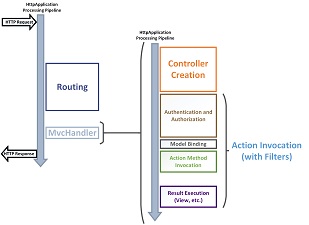 A detail view that shows drills down into the details of the request processing pipeline. You can compare the high-level view and the detail view to see how the lifecycles details are collected into the various stages. Download PDF to see a larger view.
 Placement and purpose of all overridable methods on the Controller object in the request processing pipeline. You may or may not have the need to override any one method, but it is important for you to understand their role in the application lifecycle so that you can write code at the appropriate life cycle stage for the effect you intend.Blown-up diagrams showing how each of the filter types (authentication, authorization, action, and result) is invoked.Link to a useful article or blog from each point of interest in the detail view.
Visual Studio Code Extentions
Visual Studio Code Extensions
Features
Meet IntelliSense.
Git commands built-in.
Working with Git has never been easier. Review diffs, stage files, and make commits right from the editor. Push and pull from any hosted Git service.
Extensible and customization.
Want even more features? Install extensions to add new languages, themes, debuggers, and to connect to additional services. Extensions run in separate processes, ensuring they won't slow down your editor

Variety in themes
visual studio code ships with variety of different themes and color ,you can select different font color and overall theme of the editor
Visual studio code is a light weight editor developed by Microsoft ,its very useful for client side development in j query,angular,html,css etc
there are number of extensions available to for visual studio code which are very handy for the development
Features
Meet IntelliSense.
Go beyond syntax highlighting and autocomplete with IntelliSense, which provides smart completions based on variable types, function definitions, and imported modules.
Git commands built-in.
Working with Git has never been easier. Review diffs, stage files, and make commits right from the editor. Push and pull from any hosted Git service.
Extensible and customization.
Want even more features? Install extensions to add new languages, themes, debuggers, and to connect to additional services. Extensions run in separate processes, ensuring they won't slow down your editor
Variety in themes
visual studio code ships with variety of different themes and color ,you can select different font color and overall theme of the editor
Sunday, 11 June 2017
difference between git and github
You will need to add your GitHub repo as a 'remote repository' in your Git setup. ... "GitHub is a web-based Git repository hosting service, which offers all of the distributed revision control and source code management (SCM) functionality of Gitas well as adding its own features
Subscribe to:
Posts (Atom)